Acer Aspire 7 review: Lets you work hard, game harder

It can handle your office presentation but it is born for that gaming break you take when your boss isn't looking.

Agencies
Acer Aspire 7 doesn't flaunt a typical gaming-laptop design.
Acer Aspire 7
GET IT FOR: Rs 54,990, starting
HIGHLIGHT: Performance, battery life


The Acer Aspire 7 is a pocket-friendly laptop for casual gamers. It comes in four variants: two models offer up to 9th gen Intel Core i7 processor, while the other two are powered by AMD Ryzen 3000 series chipsets.


We reviewed the Aspire A715-75G model with Intel Core i5-9300H, 8GB of DDR4 RAM, 512GB SSD, Nvidia GeForce GTX 1650 and Windows 10 Home. This model costs Rs 54,990 and it is an ideal machine to get your office work and games done smoothly. The hardware is capable of handling most games out there.

The Aspire 7 doesn't flaunt a typical gaming-laptop design. It looks like a standard workhorse but the hardware under the hood will not disappoint.

It is a huge, bulky laptop and weighs over 2 kg. It comes with a 15.6-inch IPS LCD display offering 1080p Full HD resolution with an HD webcam on top. The display quality is good given the price. The viewing angles are decent too. It is fine for watching movies but you will have to invest in good speakers as the two built-in stereo speakers offer below-average output.

ADVERTISEMENT
Talking about the build quality, the body is entirely made of plastic. But it somehow appears to be sturdy enough for the daily grind. The screen can be tilted 180 degrees.

Acer has added a backlit chiclet keypad along with a well integrated fingerprint sensor inside the mouse trackpad.

Like in most Acer laptops, the positioning of the trackpad is not the best as it is placed more towards the left. There is little space to rest your palm while using the mouse. This will most likely force you to buy a mouse.

Connectivity ports include HDMI, LAN, 1x USB Type-C port, 2x USB 3.2 Gen 1 ports, 1x USB 2.0 port and a headphone combo jack. It supports dual-band Wi-Fi 6 (802.11ax) and MU-MIMO for lag-free online gaming. The battery life is really good and can easily last for around 8 hours.

ADVERTISEMENT
The Aspire 7 is an ideal machine for those who want capable hardware that can take care of their work projects without any compromise and at the same time can offer some quality gaming breaks - all within a tight budget.

- The writer is with gadgetsnow.com

Don't Let Your Laptop Work Overtime With Food Crumbs & Coffee Stains During WFH: Smart Tips To Clean Computer
1/12

Working from home can take a toll on your computer as the time spent on laptops, notebooks, desktops, monitors and tablets has increased substantially.


With endless food crumbs, sticky liquid stains and ants finding a home in your system, it is time to give your computer the much need attention it needs.
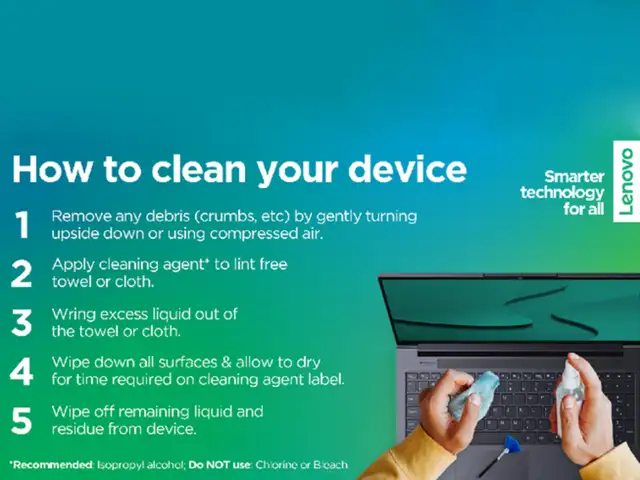
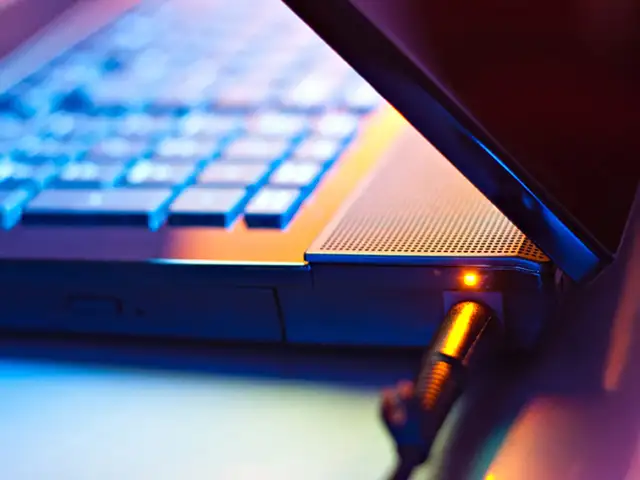
Working from home can take a toll on your computer as the time spent on laptops, notebooks, desktops, monitors and tablets has increased substantially.With endless food crumbs, sticky liquid stains a..
Read More

Your system needs proper maintainance, just like you.


Last month, as the entire world started looking for productive work options from home, Beijing-based Computer manufacturing company, Lenovo, took to Twitter to share quick steps to clean the personal computer in times of lockdown.

Your system needs proper maintainance, just like you.Last month, as the entire world started looking for productive work options from home, Beijing-based Computer manufacturing company, Lenovo, took ..
Read More
It is important to keep all frequently-used devices clean. However, ensuring the right method to clean is very important to avoid damage to devices.

It is important to follow necessary steps before beginning the cleaning process

- Remove any media from the drives and turn off all connected devices.
- Disconnect all power sources such as batteries or power cords from electrical outlets, and cables that are connected to the computer.
- Do not use wipes containing sodium hypochlorite (bleach) or chlorine based solutions.
It is important to keep all frequently-used devices clean. However, ensuring the right method to clean is very important to avoid damage to devices.It is important to follow necessary steps before be..
Read More
- Use mild (non-ammonia-based & non-abrasive) cleaning solutions, and a damp lint-free, soft cloth or sponge to clean the painted surfaces.
- Put the cleaner onto the cloth, wait for it to absorb and squeeze out excess liquid.
- Wipe in a circular motion and remove any left-over cleaner from the surface.
- Rinse the sponge/cloth, squeeze out excess liquid, and wipe the cover again.
- Repeat process with dry cloth
- After the surface drcompletely, remove fibres
- Use mild (non-ammonia-based & non-abrasive) cleaning solutions, and a damp lint-free, soft cloth or sponge to clean the painted surfaces.- Put the cleaner onto the cloth, wait for it to absorb and ..
Read More
- Put some isopropyl alcohol on a lint-free, soft cloth, and squeeze out excess liquid
- Wipe the keytop surface, ensuring no liquid drips on or between the keys
- Allow to dry.
- Never spray or pour any liquid cleaner directly on the LCD display or keyboard
- Try to use compressed air to remove crumbs and dust from beneath the keys.
- Do not use an air compressor.
- Put some isopropyl alcohol on a lint-free, soft cloth, and squeeze out excess liquid- Wipe the keytop surface, ensuring no liquid drips on or between the keys- Allow to dry.- Never spray or pour an..
Read More
- Gently wipe the display with dry, lint-free, soft and/or anti-static LCD cleaning cloth.
- Wipe or dust the stain gently.
- For regid stain, moisten the cloth with water or a 50-50 mixture of isopropyl alcohol and water (distilled or deionised).
- Wring out the liquid and wipe the display again.
- Do not let any liquid drip into the computer.
- Allow the display to dry, then close the lid if the computer has one.

Note: Isopropyl Alcohol is a flammable liquid. Do not use this cleaner near an exposed flame or when the system is on.
- Gently wipe the display with dry, lint-free, soft and/or anti-static LCD cleaning cloth.- Wipe or dust the stain gently.- For regid stain, moisten the cloth with water or a 50-50 mixture of isoprop..
Read More
- Make sure that tablets are powered off and kept away from power supplies before cleaning.
- Do not immerse tablets in any cleaning product.
- Only use soft cloth. Avoid using towels, tissues or other similar items.
- Do not wipe excessively to avoid scratches or damage.
- Unless specified otherwise, keep liquids away from tablets.
- Do not get the ports and sockets moist.
- Do not use any spray, bleach or abrasive products.
- Do not spray the cleanser directly on your tablet.
- When cleaning, please maintain a properly ventilated environment.
- Keep children away from wiping cloths that contain cleaning solvents or chemicals.
- Make sure that tablets are powered off and kept away from power supplies before cleaning.- Do not immerse tablets in any cleaning product.- Only use soft cloth. Avoid using towels, tissues or other..
Read More
- Squeeze out excess liquid from the wipe or disinfecting cloth before using
- It is safe to use a disinfecting wipe designed for office/home use
- After disinfecting, try to follow the cleaning procedure from the wipe supplier to minimise chemical buildup of disinfectant residue.
- Always allow the computer to completely dry before using.
- Squeeze out excess liquid from the wipe or disinfecting cloth before using- It is safe to use a disinfecting wipe designed for office/home use- After disinfecting, try to follow the cleaning proced..
Read More
Some disinfecting wipes (designed for medical use) may cause discolouration, harm surfaces, or even affect functionality of your device.

To minimise symptoms, follow these steps:
- Gently wipe the system thoroughly.
- Ensure no liquid drips into the computer.
- Do not wipe on connector pins.
Some disinfecting wipes (designed for medical use) may cause discolouration, harm surfaces, or even affect functionality of your device.To minimise symptoms, follow these steps:- Gently wipe the syst..
Read More
In some medical wipes, the chemical composition may vary. Depending on the chemicals, frequency, and duration of use, medical wipes may impact cosmetic appearance (like discoloration or paint bubbling) and system functionality (corrosion or function failure of electrical parts).

To minimise this risk, follow the wipes with following composition:
- Hydrogen peroxide wipes (such as Virox Accel wipes w/ a maximum of 0.5% hydrogen peroxide)
- Alcohol-based wipes (such as PDI Germicidal or B.Braun Meliseptol Wipes sensitive)
- Do not use wipes containing sodium hypochlorite (bleach)
- Wiping away residual solvent as soon as possible after the prescribed contact time
In some medical wipes, the chemical composition may vary. Depending on the chemicals, frequency, and duration of use, medical wipes may impact cosmetic appearance (like discoloration or paint bubblin..
Read More

Download
The Economic Times Business News App
for the Latest News in Business, Sensex, Stock Market Updates & More.
READ MORE
ADVERTISEMENT

READ MORE:

LOGIN & CLAIM

50 TIMESPOINTS

More from our Partners

Loading next story
Business News › Magazines › Panache › Acer Aspire 7 review: Lets you work hard, game harder
Text Size:AAA
Success
This article has been saved

*

+