Toshiba, Einfochips to develop chips for Google's Ara modules
Those chips will be developed in partnership with Einfochips, the executive said, adding the Gujarat-based company will also verify the chips.
By PTI | Updated:

AHMEDABAD: Techno major Toshiba in collaboration with Gujarat-based Einfochips will provide chips for Google's revolutionary modular smartphone project, 'Ara', a senior company executive said here today.
"Google is designing modular smartphones in which different modules can be assembled as one smart-phone," said senior vice president and chief technology officer, Toshiba, USA, Shardul Kazi.
"Toshiba will make chips which can be used in modules and in the base plate, and will give idea on what kind of modules can be developed," Kazi said.
Those chips will be developed in partnership with Einfochips, the executive said, adding the Gujarat-based company will also verify the chips.
On 'Ara', Kazi said consumers can make their own smartphone as per their demands or can upgrade it with new features they like to set in the modular phone.
Kazi said the modular phone has a skeleton or a base-plate body, where consumer can set required hardware applications in the form of a magnetic ship module.
Two versions of phones have been already developed, which include Spiral-one and Spiral-two, Kazi said.
Spiral-one and two have been made available for the module developers, while Spiral-3 will be made available for consumers.
Project Ara's Spiral-3 will be introduced on pilot basis in Caribbean island country Puerto Rico.
When asked about the price of the modular phones, Kazi said, "Price will be fixed by Google. However, different modules will be ranging from USD 50 to 5,000."
He said the cost can be cut to make it affordable for consumers.
"Google is designing modular smartphones in which different modules can be assembled as one smart-phone," said senior vice president and chief technology officer, Toshiba, USA, Shardul Kazi.
"Toshiba will make chips which can be used in modules and in the base plate, and will give idea on what kind of modules can be developed," Kazi said.
Those chips will be developed in partnership with Einfochips, the executive said, adding the Gujarat-based company will also verify the chips.
On 'Ara', Kazi said consumers can make their own smartphone as per their demands or can upgrade it with new features they like to set in the modular phone.
Kazi said the modular phone has a skeleton or a base-plate body, where consumer can set required hardware applications in the form of a magnetic ship module.
ADVERTISEMENT
Two versions of phones have been already developed, which include Spiral-one and Spiral-two, Kazi said.
Spiral-one and two have been made available for the module developers, while Spiral-3 will be made available for consumers.
Project Ara's Spiral-3 will be introduced on pilot basis in Caribbean island country Puerto Rico.
When asked about the price of the modular phones, Kazi said, "Price will be fixed by Google. However, different modules will be ranging from USD 50 to 5,000."
ADVERTISEMENT
He said the cost can be cut to make it affordable for consumers.
Download
The Economic Times Business News App for the Latest News in Business, Sensex, Stock Market Updates & More.
The Economic Times Business News App for the Latest News in Business, Sensex, Stock Market Updates & More.
Download
The Economic Times News App for Quarterly Results, Latest News in ITR, Business, Share Market, Live Sensex News & More.
The Economic Times News App for Quarterly Results, Latest News in ITR, Business, Share Market, Live Sensex News & More.
Related Articles
 Toshiba mulls 55-Billion-Yen investment to more than double output in Japan, India2025-10-17T10:30:50Z
- Toshiba inks pact to invest Rs 562 cr to expand manufacturing capacity in Telangana2025-04-21T09:55:04Z
- Toshiba to invest Rs 500 crore to increase production capacity of power transmission2024-07-18T10:12:57Z
BusinessInsider.in
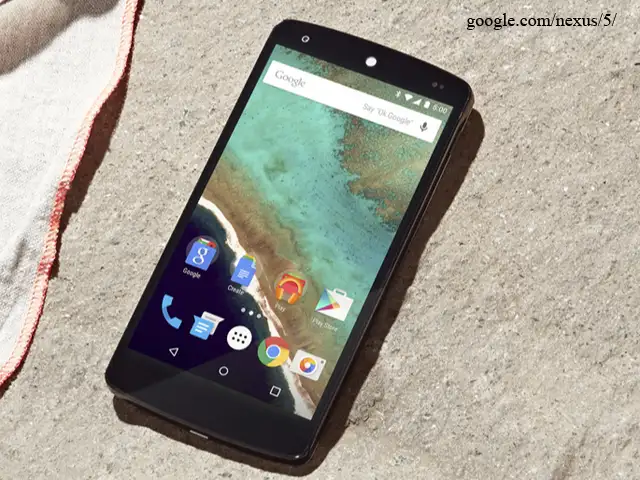
Most Android phones are already pretty easy to use, but there are some easy steps you can take to make them even more enjoyable and efficient.
Since Android is an open platform, there's plenty of room for customization. Beyond personalizing your phone, there are a few easy practices that can keep your phone neat and organized with plenty of battery life to last all day.
Here are nine tips and tricks every Android user should know.
Most Android phones are already pretty easy to use, but there are some easy steps you can take to make them even more enjoyable and efficient.
Since Android is an open platform, there's plenty of room for customization. Beyond personalizing your phone, there are a few easy practices that can keep your phone neat and organized with plenty of battery life to last all day.
Here are nine tips and tricks every Android user should know.

ADVERTISEMENT


