
Nine iOS 11 features Apple didn’t talk about

1/10
Misssed the point
Apple unveiled iOS 11, the latest version of its mobile operating system, at its recently-held WWDC 2017 developers’ conference.
While the company detailed the primary features of the new OS, it didn’t talk about all of them. Interested to find out more?
Here are 9 exciting features of the upcoming iOS 11 that Apple didn’t talk about at WWDC 2017.
By Komal Mohan | Gadgets Now
While the company detailed the primary features of the new OS, it didn’t talk about all of them. Interested to find out more?
Here are 9 exciting features of the upcoming iOS 11 that Apple didn’t talk about at WWDC 2017.
By Komal Mohan | Gadgets Now

2/10
Type to Siri
One of the most requested features by users, iOS 11 allows users to type queries to Siri instead of just speaking them.
Google Assistant already has this functionality on Android. The feature can come in really handy in noisy situations. To activate ‘Type to Siri’ option, users need to navigate to General Settings. It’s worth noting that iOS 10 also allows questions to be typed to Siri.
But to do this, one needs to tap on a previous spoken query and then edit it.
Google Assistant already has this functionality on Android. The feature can come in really handy in noisy situations. To activate ‘Type to Siri’ option, users need to navigate to General Settings. It’s worth noting that iOS 10 also allows questions to be typed to Siri.
But to do this, one needs to tap on a previous spoken query and then edit it.
3/10
Screen recording
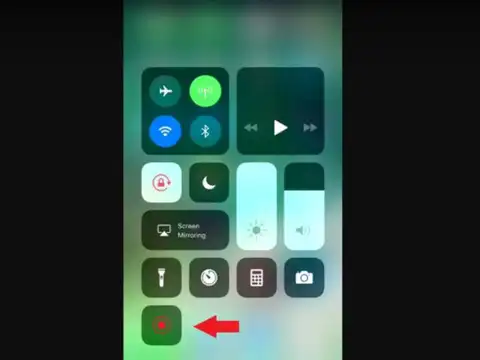
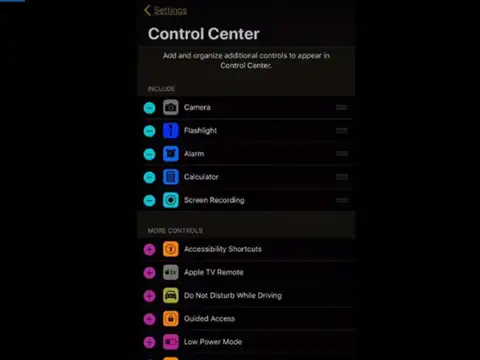
Apple iOS 11 natively includes the functionality to record the smartphone’s screen and save the resulting video to the device’s camera roll.
The feature can be accessed through Control Center and is capable of recording external audio. Even though Android doesn’t offer screen recording natively (yet), many OEMs include the feature in their smartphones via custom UI layers. (Picture courtesy: Twitter @fvizs)
The feature can be accessed through Control Center and is capable of recording external audio. Even though Android doesn’t offer screen recording natively (yet), many OEMs include the feature in their smartphones via custom UI layers. (Picture courtesy: Twitter @fvizs)
Amazon Top Deals
POWERED BY

4/10
Screenshot and markup
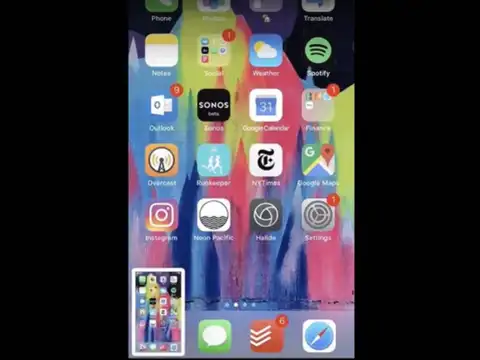
Until now, after taking a screenshot on an iPhone, users have been required to go the Photos app to view it. This is set to change with iOS 11.
Once a screenshot is taken, a miniature version of it is shown in the bottom left corner. Users can directly tap on it to edit it as they see fit. (Picture courtesy: Twitter @ow)
Once a screenshot is taken, a miniature version of it is shown in the bottom left corner. Users can directly tap on it to edit it as they see fit. (Picture courtesy: Twitter @ow)

5/10
One-handed keyboard
With iOS 11, users can enable a one-handed mode for the default keyboard, allowing users to type in the text when they have only one hand at disposal.
This feature will be best suited for the bigger sized iPhones such as iPhone 6 Plus, iPhone 6s Plus and iPhone 7 Plus. This feature can be enabled long-pressing the globe icon to the left of the space bar, which will then list both left and right configuration of the keyboard.
This feature will be best suited for the bigger sized iPhones such as iPhone 6 Plus, iPhone 6s Plus and iPhone 7 Plus. This feature can be enabled long-pressing the globe icon to the left of the space bar, which will then list both left and right configuration of the keyboard.
6/10
Wi-Fi password sharing
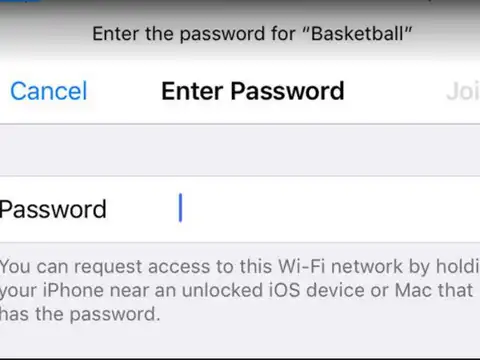
The new version of iOS also makes it easier for users to share their Wi-Fi passwords with other iOS devices.
The only requirement is that all of them should be running iOS 11. There’s a simple method of communicating Wi-Fi passwords over-the-air to non-connected devices.
All that the user needs to do is bring the target device (the one that is to be connected to Wi-Fi) close to the Wi-Fi connected device. Upon doing this, the first device will display a pop-up message saying that a new device is trying to join the network.
With a single tap, the password can be sent to the other device. (Picture courtesy: Twitter @chrismaddern)
The only requirement is that all of them should be running iOS 11. There’s a simple method of communicating Wi-Fi passwords over-the-air to non-connected devices.
All that the user needs to do is bring the target device (the one that is to be connected to Wi-Fi) close to the Wi-Fi connected device. Upon doing this, the first device will display a pop-up message saying that a new device is trying to join the network.
With a single tap, the password can be sent to the other device. (Picture courtesy: Twitter @chrismaddern)

7/10
Change tracks on AirPods
Currently, AirPods users can only change tracks on their iOS devices by starting Siri with a double tap on an AirPod and issuing a voice command.
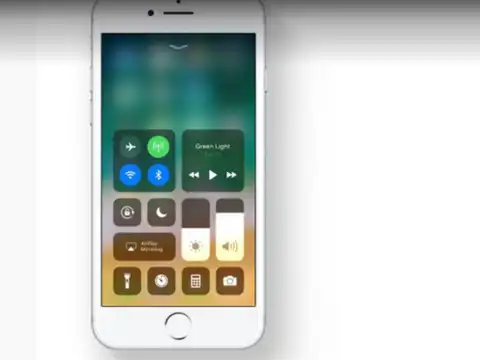
But iOS 11 makes this process simpler. With the new OS, users can customize Bluetooth settings on the AirPods to configure direct skip and forward gestures with double-taps on both AirPods.
But iOS 11 makes this process simpler. With the new OS, users can customize Bluetooth settings on the AirPods to configure direct skip and forward gestures with double-taps on both AirPods.
8/10
3D Touch integration
With iOS 11, Apple is expanding the integration of its 3D Touch technology in apps like Safari and iMessage.
The new OS lets users switch between tabs in Safari, share URLs in messages and “look up” quick notifications of highlighted words/phrases.
The new OS lets users switch between tabs in Safari, share URLs in messages and “look up” quick notifications of highlighted words/phrases.
9/10
Smart Invert
Accessible under Accessibility in General settings, Smart Invert reverses the colour of the entire display, except for images, media and some apps that use dark colour schemes.
It’s worth noting that this doesn’t replace the ‘Invert Colour’ functionality that’s already present in iOS 10. (Picture Courtesy: Twitter @Anki_009)
It’s worth noting that this doesn’t replace the ‘Invert Colour’ functionality that’s already present in iOS 10. (Picture Courtesy: Twitter @Anki_009)
10/10
iCloud family storage plans
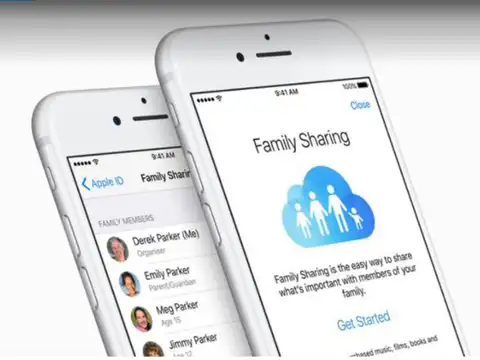
If you and your family members own multiple Apple devices, and use them to share media such as photos and videos, it makes no sense for each member to have their own iCloud storage plan. Thankfully, iOS 11 makes it possible to have shared iCloud storage plans.
Up to six members of a family can share a common iCloud storage plan between them. This can be done without having to incur any extra costs on a monthly basis.
Up to six members of a family can share a common iCloud storage plan between them. This can be done without having to incur any extra costs on a monthly basis.