
Now you can share HD images on WhatsApp. Here's How
1/5
WhatsApp new feature
In the digital age, capturing and sharing precious moments through images has become part of our lives. We all want to ensure that the memories we share remain as vibrant and clear as the moments themselves. To make it easy, WhatsApp has launched its new HD image-sharing feature.
2/5
Share HD images
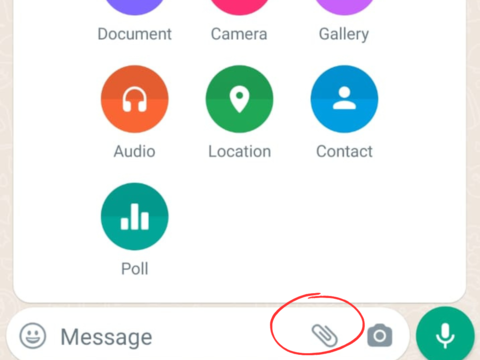
On WhatsApp, select a chat where you want to send an HD photo or video. Simply tap on the attachment icon (paperclip icon), and choose 'Gallery' to share all the images in one go.
3/5
Select the images
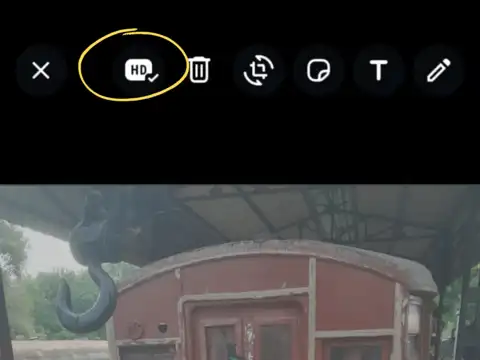
Once you're on the photo-sharing screen, you'll spot a new HD button right up there with other image tools like rotate and crop. Give that HD button a gentle tap and your images will be ready to be shared in high-quality.
Amazon Top Deals
POWERED BY

4/5
Understanding the image quality
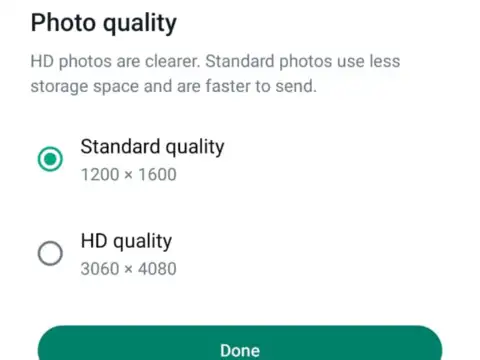
By default, the Standard Quality (1200*1600) is set on the app. If you want your images to be in HD, select the HD option and WhatsApp will format your images in (3060*4080) format.
5/5
Hit 'Send'
This new feature will compress your photos and videos while preserving the original resolution and quality of them.