Your work surface height should facilitate your feet being planted solidly on, and your forearms being parallel with the floor.
Whether you’re working from your couch, the dining table or the kitchen counter, your designated workspace should support the devices you need to do your job. You shouldn't need to bend or stretch your body for an extended period, as this can contribute to muscle fatigue and even discomfort, like headaches.
If you still haven't found a designated workspace at home, office furniture manufacturer Herman Miller has a few tips on their website that can help you convert any flat surface in your home into a decent home office setup.
- Select a work surface that is elbow height when sitting so that your shoulders are relaxed and your forearms are parallel with the work surface or angled down toward your work surface so that your wrists are resting in a neutral angle.
- Your work surface height should facilitate your feet being planted solidly on, and your forearms being parallel with the floor.
- Pay attention to how your body naturally positions itself when you sit down. Look for a seat height that allows you to plant your feet on the ground comfortably while your thighs are parallel with the floor.
- Check that the top third of your monitor is eye height and your screen is about an arm's distance away.
ADVERTISEMENT
- Try stacking books under your feet if your chair seems too high.
- Your keyboard and mouse should be within easy reach of your hands without needing to bend your wrists to reach up or down.
- Plan on only standing to work for about one hour for every one to two that you sit to work.
- Switch it up - It's better for your body to be in a variety of imperfect positions throughout the day rather than to be stuck in one.
ADVERTISEMENT
Don't Let Your Laptop Work Overtime With Food Crumbs & Coffee Stains During WFH: Smart Tips To Clean Computer
1/12
Working from home can take a toll on your computer as the time spent on laptops, notebooks, desktops, monitors and tablets has increased substantially.
With endless food crumbs, sticky liquid stains and ants finding a home in your system, it is time to give your computer the much need attention it needs.
Working from home can take a toll on your computer as the time spent on laptops, notebooks, desktops, monitors and tablets has increased substantially.With endless food crumbs, sticky liquid stains a..
Read More
Your system needs proper maintainance, just like you.
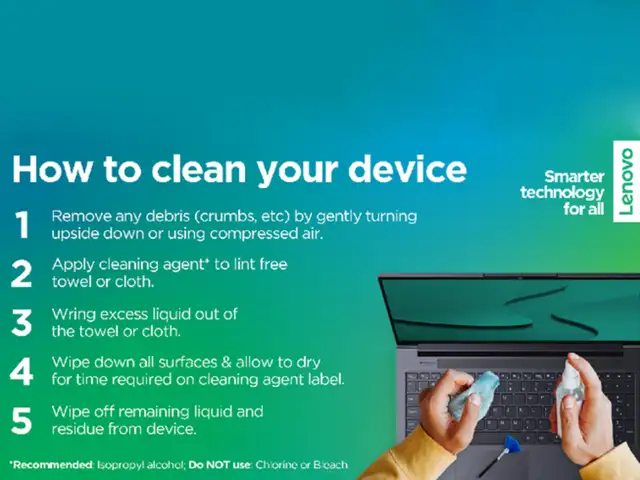
Last month, as the entire world started looking for productive work options from home, Beijing-based Computer manufacturing company, Lenovo, took to Twitter to share quick steps to clean the personal computer in times of lockdown.
Your system needs proper maintainance, just like you.Last month, as the entire world started looking for productive work options from home, Beijing-based Computer manufacturing company, Lenovo, took ..
Read More
It is important to keep all frequently-used devices clean. However, ensuring the right method to clean is very important to avoid damage to devices.
It is important to follow necessary steps before beginning the cleaning process
- Remove any media from the drives and turn off all connected devices. - Disconnect all power sources such as batteries or power cords from electrical outlets, and cables that are connected to the computer. - Do not use wipes containing sodium hypochlorite (bleach) or chlorine based solutions.
It is important to keep all frequently-used devices clean. However, ensuring the right method to clean is very important to avoid damage to devices.It is important to follow necessary steps before be..
Read More
- Use mild (non-ammonia-based & non-abrasive) cleaning solutions, and a damp lint-free, soft cloth or sponge to clean the painted surfaces. - Put the cleaner onto the cloth, wait for it to absorb and squeeze out excess liquid. - Wipe in a circular motion and remove any left-over cleaner from the surface. - Rinse the sponge/cloth, squeeze out excess liquid, and wipe the cover again. - Repeat process with dry cloth - After the surface drcompletely, remove fibres
- Use mild (non-ammonia-based & non-abrasive) cleaning solutions, and a damp lint-free, soft cloth or sponge to clean the painted surfaces.- Put the cleaner onto the cloth, wait for it to absorb and ..
Read More
- Put some isopropyl alcohol on a lint-free, soft cloth, and squeeze out excess liquid - Wipe the keytop surface, ensuring no liquid drips on or between the keys - Allow to dry. - Never spray or pour any liquid cleaner directly on the LCD display or keyboard - Try to use compressed air to remove crumbs and dust from beneath the keys. - Do not use an air compressor.
- Put some isopropyl alcohol on a lint-free, soft cloth, and squeeze out excess liquid- Wipe the keytop surface, ensuring no liquid drips on or between the keys- Allow to dry.- Never spray or pour an..
Read More
- Gently wipe the display with dry, lint-free, soft and/or anti-static LCD cleaning cloth. - Wipe or dust the stain gently. - For regid stain, moisten the cloth with water or a 50-50 mixture of isopropyl alcohol and water (distilled or deionised). - Wring out the liquid and wipe the display again. - Do not let any liquid drip into the computer. - Allow the display to dry, then close the lid if the computer has one.
Note: Isopropyl Alcohol is a flammable liquid. Do not use this cleaner near an exposed flame or when the system is on.
- Gently wipe the display with dry, lint-free, soft and/or anti-static LCD cleaning cloth.- Wipe or dust the stain gently.- For regid stain, moisten the cloth with water or a 50-50 mixture of isoprop..
Read More
- Make sure that tablets are powered off and kept away from power supplies before cleaning. - Do not immerse tablets in any cleaning product. - Only use soft cloth. Avoid using towels, tissues or other similar items. - Do not wipe excessively to avoid scratches or damage. - Unless specified otherwise, keep liquids away from tablets. - Do not get the ports and sockets moist. - Do not use any spray, bleach or abrasive products. - Do not spray the cleanser directly on your tablet. - When cleaning, please maintain a properly ventilated environment. - Keep children away from wiping cloths that contain cleaning solvents or chemicals.
- Make sure that tablets are powered off and kept away from power supplies before cleaning.- Do not immerse tablets in any cleaning product.- Only use soft cloth. Avoid using towels, tissues or other..
Read More
- Squeeze out excess liquid from the wipe or disinfecting cloth before using - It is safe to use a disinfecting wipe designed for office/home use - After disinfecting, try to follow the cleaning procedure from the wipe supplier to minimise chemical buildup of disinfectant residue. - Always allow the computer to completely dry before using.
- Squeeze out excess liquid from the wipe or disinfecting cloth before using- It is safe to use a disinfecting wipe designed for office/home use- After disinfecting, try to follow the cleaning proced..
Read More
Some disinfecting wipes (designed for medical use) may cause discolouration, harm surfaces, or even affect functionality of your device.
To minimise symptoms, follow these steps: - Gently wipe the system thoroughly. - Ensure no liquid drips into the computer. - Do not wipe on connector pins.
Some disinfecting wipes (designed for medical use) may cause discolouration, harm surfaces, or even affect functionality of your device.To minimise symptoms, follow these steps:- Gently wipe the syst..
Read More
In some medical wipes, the chemical composition may vary. Depending on the chemicals, frequency, and duration of use, medical wipes may impact cosmetic appearance (like discoloration or paint bubbling) and system functionality (corrosion or function failure of electrical parts).
To minimise this risk, follow the wipes with following composition: - Hydrogen peroxide wipes (such as Virox Accel wipes w/ a maximum of 0.5% hydrogen peroxide) - Alcohol-based wipes (such as PDI Germicidal or B.Braun Meliseptol Wipes sensitive) - Do not use wipes containing sodium hypochlorite (bleach) - Wiping away residual solvent as soon as possible after the prescribed contact time
In some medical wipes, the chemical composition may vary. Depending on the chemicals, frequency, and duration of use, medical wipes may impact cosmetic appearance (like discoloration or paint bubblin..