Six apps every iPhone user must have to show off the power and potential of Apple’s superphone
Make the most of your phone with augmented reality, better photos and new features.
By ET Bureau | Updated:

You have managed to get your hands on a new iPhone 8 or iPhone 8 Plus, and now you need a few cool things to do with it.
Here are some of the off-the-beaten track apps that show off the power and potential of Apple’s superphone. This list includes both obvious choices you can find on the top charts, and lesser-known software that you will love to use.
1. The IKEA Place app uses Apple’s augmented reality software to give a peek at the future of apps and rearrange your living room. It gives you an accurate impression of the furniture’s size, design and functionality in your home so you can stop wondering and start doing.
2. Strava is a social network for fitness buffs. Runners, cyclists and active people can use Strava to record their activities, compare performance over time, connect with their community, and share the photos, stories and highlights of their adventures with friends.

3. VSCO is an excellent photo editing tool and social network. The app claims it helps you reach your creative potential within a community that values honest and imaginative expression. You can also follow and engage with creative people from around the world.
4. Amazon Kindle puts books on your phone. eBooks (including those with narration) that you have purchased on Amazon will automatically appear in your app. Kindle Unlimited and Amazon Prime members can select and download eBooks directly.
5. Trip helps you find cool things to do in any city. It uses your interests, the time of day, the local weather and your location to help you discover the best attractions, events, and restaurants.
6. WLPPR has sweet backgrounds for your lock and home screen. It collects satellite images from numerous sources to ensure variety. Each week it adds several new images to all of its galleries for you to choose from.
Here are some of the off-the-beaten track apps that show off the power and potential of Apple’s superphone. This list includes both obvious choices you can find on the top charts, and lesser-known software that you will love to use.
1. The IKEA Place app uses Apple’s augmented reality software to give a peek at the future of apps and rearrange your living room. It gives you an accurate impression of the furniture’s size, design and functionality in your home so you can stop wondering and start doing.
2. Strava is a social network for fitness buffs. Runners, cyclists and active people can use Strava to record their activities, compare performance over time, connect with their community, and share the photos, stories and highlights of their adventures with friends.
3. VSCO is an excellent photo editing tool and social network. The app claims it helps you reach your creative potential within a community that values honest and imaginative expression. You can also follow and engage with creative people from around the world.
4. Amazon Kindle puts books on your phone. eBooks (including those with narration) that you have purchased on Amazon will automatically appear in your app. Kindle Unlimited and Amazon Prime members can select and download eBooks directly.
ADVERTISEMENT
5. Trip helps you find cool things to do in any city. It uses your interests, the time of day, the local weather and your location to help you discover the best attractions, events, and restaurants.
6. WLPPR has sweet backgrounds for your lock and home screen. It collects satellite images from numerous sources to ensure variety. Each week it adds several new images to all of its galleries for you to choose from.
Download
The Economic Times Business News App for the Latest News in Business, Sensex, Stock Market Updates & More.
The Economic Times Business News App for the Latest News in Business, Sensex, Stock Market Updates & More.
Related Articles
 Apple explains why watchOS 27 drops support for Apple Watch series 6, 7, 8 and Ultra2026-06-20T10:02:47Z
- Apple iPhone 18 Pro Max Price in India: Check expected launch date, design, display, camera, colours, specifications and more2026-06-19T10:38:47Z
- In 1981, when ISRO carried its APPLE on bullock cart for just Rs 150, the world laughed; Today, the same story is hailed as a masterstroke of innovation2026-06-19T04:42:15Z
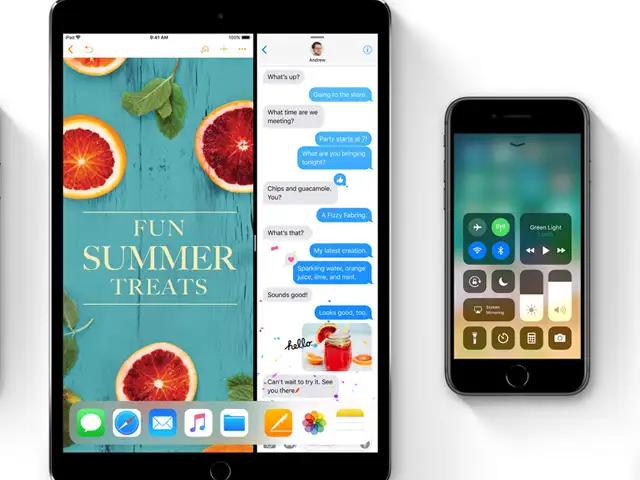
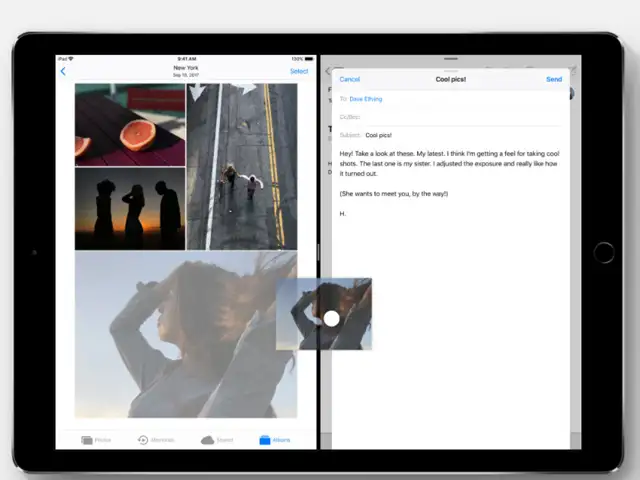
The iPad is a different story. That's where Apple has made the most radical changes to the way you open and manage your apps.
Here's what you should play around with after you upgrade:


ADVERTISEMENT


