Facebook may make you depressed, says study
Frequent Facebook use may be associated with a higher risk of depressive symptoms, a new study has warned.
By PTI | Updated:

HOUSTON: Frequent Facebook use may be associated with a higher risk of depressive symptoms, a new study has warned.
Some users may find themselves spending quite a bit of time viewing Facebook and may inevitably begin comparing what is happening in their lives to the activities and accomplishments of their friends.
This kind of social comparison paired with the amount of time spent on Facebook may be linked to depressive symptoms, researchers said.
"Although social comparison processes have been examined at length in traditional contexts, the literature is only beginning to explore social comparisons in online social networking settings," said Mai-Ly Steers, a doctoral candidate in social psychology at the University of Houston (UH).
Steers conducted two studies to investigate how social comparison to peers on Facebook might impact users' psychological health.
Both studies provide evidence that Facebook users felt depressed when comparing themselves to others.
"It doesn't mean Facebook causes depression, but that depressed feelings and lots of time on Facebook and comparing oneself to others tend to go hand in hand," said Steers.
The first study found an association between time spent on Facebook and depressive symptoms for both genders.
However, the results demonstrated that making Facebook social comparisons mediated the link between time spent on Facebook and depressive symptoms for men only.
Similarly, the second study found a relationship between the amount of time spent on Facebook and depressive symptoms was mediated by social comparisons on Facebook. Unlike the first study, gender did not moderate these associations.
"One danger is that Facebook often gives us information about our friends that we are not normally privy to, which gives us even more opportunities to socially compare," Steers said.
"You can't really control the impulse to compare because you never know what your friends are going to post. In addition, most of our Facebook friends tend to post about the good things that occur in their lives, while leaving out the bad," Steers said.
Steers said that people afflicted with emotional difficulties may be particularly susceptible to depressive symptoms due to Facebook social comparison after spending more time on medium.
For already distressed individuals, this distorted view of their friends' lives may make them feel alone in their internal struggles, which may compound their feelings of loneliness and isolation.
The research was published in the Journal of Social and Clinical Psychology.
Some users may find themselves spending quite a bit of time viewing Facebook and may inevitably begin comparing what is happening in their lives to the activities and accomplishments of their friends.
This kind of social comparison paired with the amount of time spent on Facebook may be linked to depressive symptoms, researchers said.
"Although social comparison processes have been examined at length in traditional contexts, the literature is only beginning to explore social comparisons in online social networking settings," said Mai-Ly Steers, a doctoral candidate in social psychology at the University of Houston (UH).
Steers conducted two studies to investigate how social comparison to peers on Facebook might impact users' psychological health.
Both studies provide evidence that Facebook users felt depressed when comparing themselves to others.
ADVERTISEMENT
"It doesn't mean Facebook causes depression, but that depressed feelings and lots of time on Facebook and comparing oneself to others tend to go hand in hand," said Steers.
The first study found an association between time spent on Facebook and depressive symptoms for both genders.
However, the results demonstrated that making Facebook social comparisons mediated the link between time spent on Facebook and depressive symptoms for men only.
Similarly, the second study found a relationship between the amount of time spent on Facebook and depressive symptoms was mediated by social comparisons on Facebook. Unlike the first study, gender did not moderate these associations.
ADVERTISEMENT
"One danger is that Facebook often gives us information about our friends that we are not normally privy to, which gives us even more opportunities to socially compare," Steers said.
"You can't really control the impulse to compare because you never know what your friends are going to post. In addition, most of our Facebook friends tend to post about the good things that occur in their lives, while leaving out the bad," Steers said.
ADVERTISEMENT
"If we're comparing ourselves to our friends' 'highlight reels,' this may lead us to think their lives are better than they actually are and conversely, make us feel worse about our own lives," said Steers. Steers said that people afflicted with emotional difficulties may be particularly susceptible to depressive symptoms due to Facebook social comparison after spending more time on medium.
For already distressed individuals, this distorted view of their friends' lives may make them feel alone in their internal struggles, which may compound their feelings of loneliness and isolation.
The research was published in the Journal of Social and Clinical Psychology.
Download
The Economic Times Business News App for the Latest News in Business, Sensex, Stock Market Updates & More.
The Economic Times Business News App for the Latest News in Business, Sensex, Stock Market Updates & More.
Related Articles
 Facebook privacy settlement checks coming from June 9 - here’s who qualifies, how much you’ll get and everything you need to know2026-06-05T13:12:40Z
- Thai watchdog to sue Meta over Facebook scam ads targeting users2026-06-05T04:30:18Z
- Court rules EU must drop strict curbs on Facebook Marketplace2026-06-03T08:15:49Z
BusinessInsider.in
Facebook doesn't exactly make it easy for you to stay off its radar.
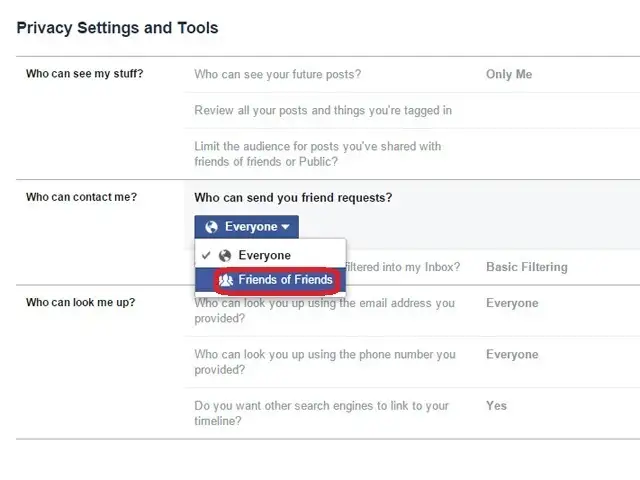
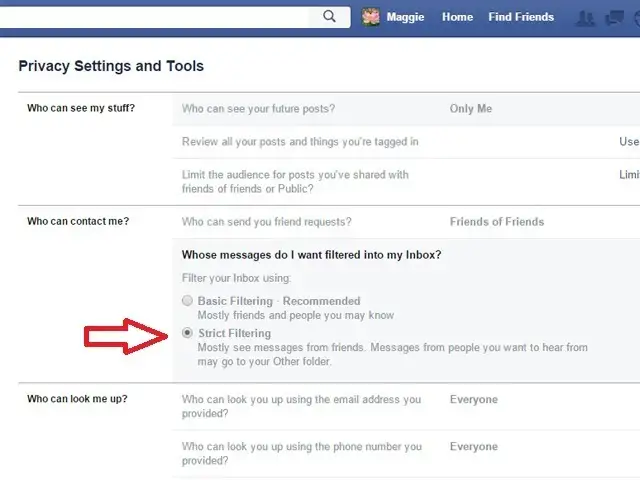
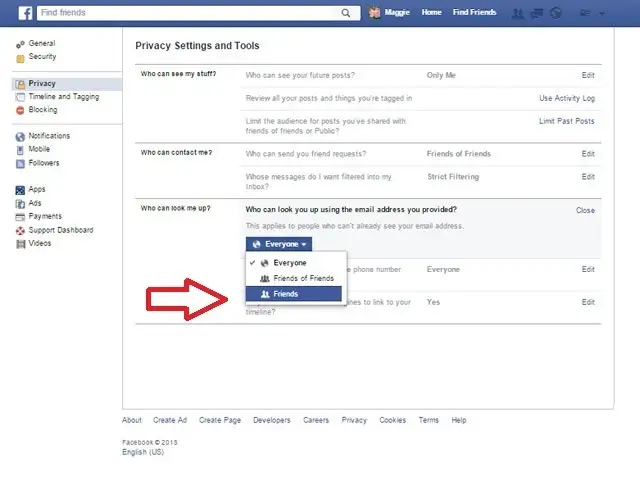
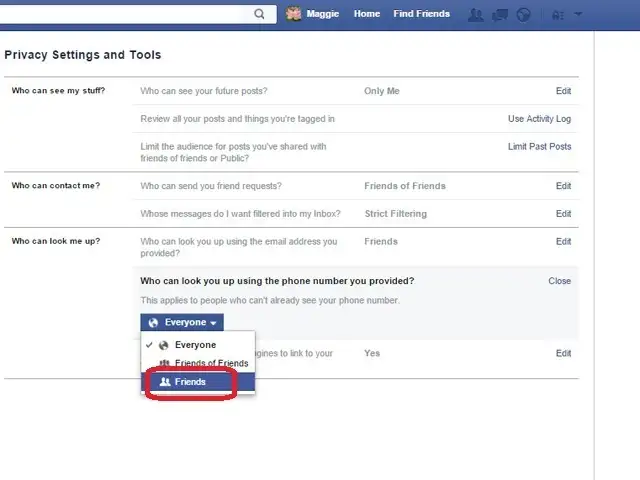
If you want to stay hidden on Facebook, however, we can help you out.
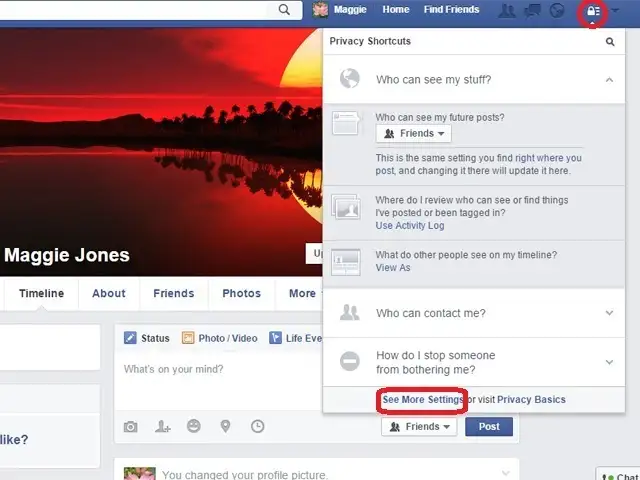
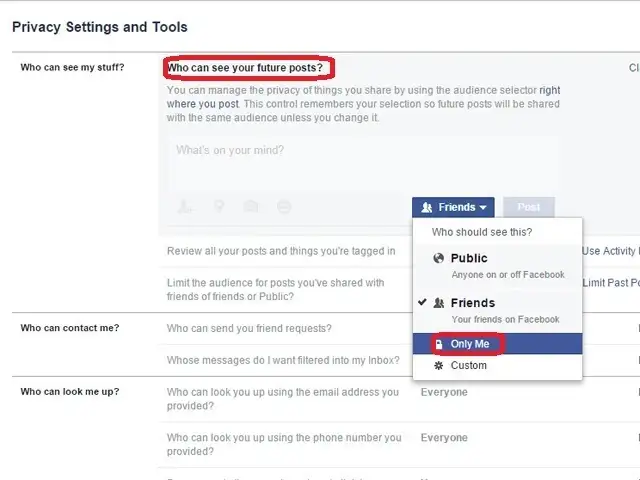
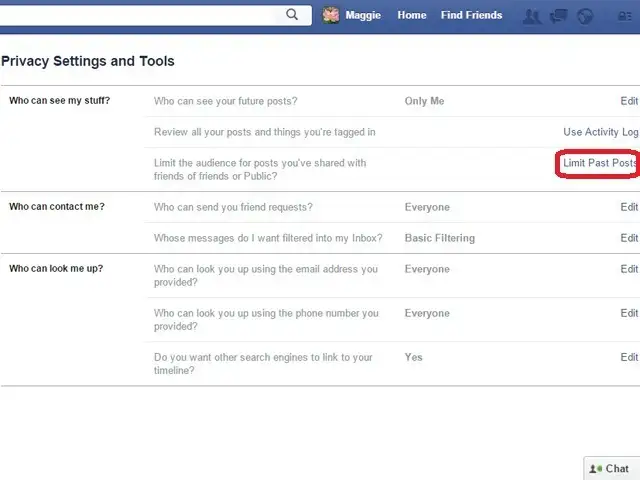
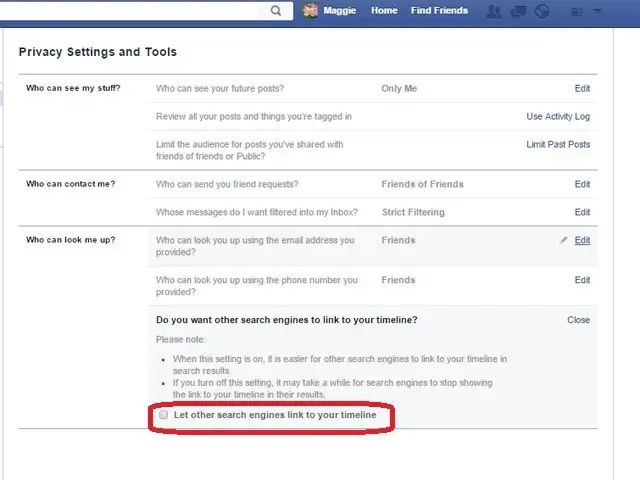
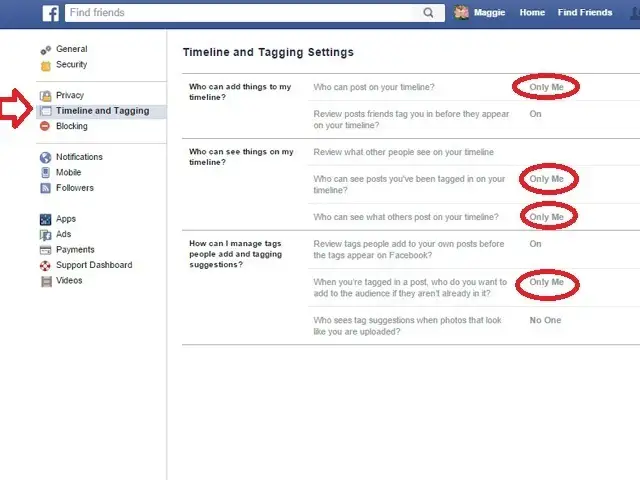
When you're finished with this process, no one but you will be able to see your Facebook activity, view your photos, or see where you've checked in. Your current friends will still be able to view your basic profile - there's no way around this - but all your activities will be blank.
Note: You don't have to block all the features we suggest. You can pick and choose.
Facebook doesn't exactly make it easy for you to stay off its radar.
If you want to stay hidden on Facebook, however, we can help you out.
When you're finished with this process, no one but you will be able to see your Facebook activity, view your photos, or see where you've checked in. Your current friends will still be able to view your basic profile - there's no way around this - but all your activities will be blank.
Note: You don't have to block all the features we suggest. You can pick and choose.

ADVERTISEMENT


