Everyone is obsessed with shrinking bezels these days. We already have thin bezels on our TVs, laptops and phones — so why not tablets? Now in it’s third generation, the iPad Pro is more powerful than ever but also thinner than ever. It’s a feat that Apple seems to pull off with consummate ease every year.
Thinner bezels mean that the home button is gone — being pushed further into obscurity & replaced by gestures. Like the iPhone X/XS and so many other new phones, you can swipe to go home and swipe up and hold for multitasking. Replacing the Touch ID system is Apple’s Face ID. Unlike the iPhone, Face ID here works in any orientation — even with the iPad upside down. It’s just as fast as the iPhone XS and also prompts you in case your hand is obstructing the camera.
Worth mentioning is the pixel masking technique Apple uses to round the corners of the LCD — it’s similar to the iPhone XR. Apple calls this their Liquid Retina display. LCDs normally have sharp corners but Apple masks them to match the corners of the device itself — a subtle but highly pleasing effect. And we can talk volumes about the display. Sure, it’s only LCD but Apple has put every bit of tech it knows into making this display just about the best on any portable device: 120Hz refresh rate (ProMotion), True Tone colour, P3 wide colour gamut, anti-reflective and 600 nits of brightness. There are two sizes available: 11-inch (2388 x 1668 pixels) and 12.9-inch (2732 x 2048 pixels). The 11-inch is the same overall size as the previous generation 10.5-inch. The 12.9-inch is significantly smaller than the previous 12.9-inch. Chalk it all up to the tiny bezels.
ADVERTISEMENT
The new Apple Pencil (a separate purchase for Rs 10,900) attaches magnetically to the iPad and charges wirelessly. The sheer power of this new iPad is not apparent in everyday tasks — even the first generation iPad Pro is more than up to the job. But Apple has managed to shoehorn a massive amount of firepower into a tablet that doesn’t have any active cooling systems. So when they say the A12X Bionic is more powerful than most laptops, they actually mean it. We’re talking about Geekbench scores of over 5000 (single core) and 18,000 (multi core) — more than a typical Core i7 laptop. This means it’s capable enough to run the most demanding apps today plus the updates and apps for years to come.
We should also talk about the new Apple Pencil (a separate purchase for Rs 10,900). It now attaches magnetically to the iPad and charges wirelessly. A massive improvement for sure, but it’s not compatible with the older iPad Pro and neither is the older Pencil compatible here. The keyboard case is nice though not essential — you can use any third-party case and Bluetooth keyboard. The first party case is just a lot sleeker. Finally, let’s talk about the shift from Lightning to USB-C. It’s great because you can use third-party type C docks and you can reverse charge a phone. It’s got fast charge, 4K video out, high speed transfers and there are a bunch of high quality (but expensive) first-party adapters on offer.
But the question remains — can it replace your computer? It sure is powerful, has a great screen and camera (despite the removal of OIS) plus a 10 hour battery life as usual. However, there’s no universal answer to this question. If you’re adept at iOS, it’s going to be easy for you. But you will also inevitably run into some limitations from time-to-time — limitations inherent to the use of a mobile operating system. You’ll have to find workarounds for them which is sometimes annoying.
ADVERTISEMENT
That being said, we’re really enjoying using the Pro. In the past few weeks, given a choice between a laptop and the iPad Pro 12.9, we found ourselves reaching for the Pro every time. And that’s saying a lot! We also think the 256GB version is in the sweet spot. If you don’t mind the price, there’s no better tablet out there.
6 Amazing Augmented Reality Experiences On iPad That Are Free
1/7
Even though augmented reality (AR) apps have been around for a long time, we’re still only beginning to scratch the surface of possibilities. New iPads are among the best way to experience AR thanks to the large screens, faster processors and Apple’s ARkit framework. Here are some genuinely astonishing AR apps that are available completely free.
Even though augmented reality (AR) apps have been around for a long time, we’re still only beginning to scratch the surface of possibilities. New iPads are among the best way to experience AR thanks ..
Read More
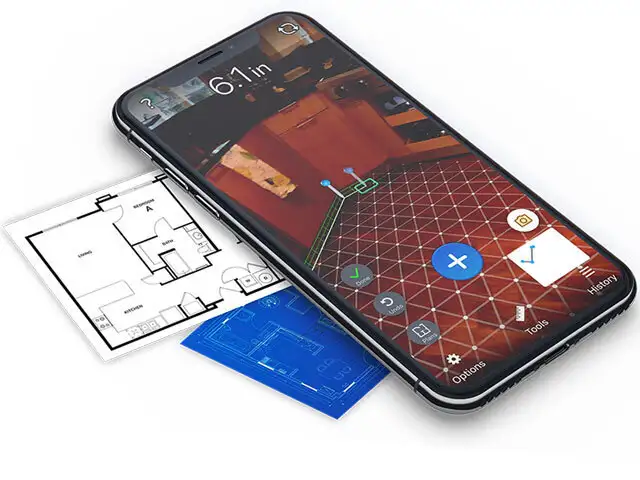
Using tape measures is so old school now that you have AR to help. It sounds almost unbelievable but you can actually measure (with a fair degree of accuracy) things like a person’s height, the diameter of a circular table, the length of a sofa and even the height of a building. AirMeasure gives you a point and shoot ruler — just tap to start and move the device along the plane you want to measure. But that’s not all, you can use it to create a floor plan, project a level line (to see whether your painting is hung straight), measure distance to a far away wall (like a laser distance measurement tool) and much more. Our favourite is the virtual furniture — you can place things like tables, chairs, beds, desks, shelves and so on into your room. Then walk around them to see how they look from different parts of the room.
(Image: http://armeasure.com)
Using tape measures is so old school now that you have AR to help. It sounds almost unbelievable but you can actually measure (with a fair degree of accuracy) things like a person’s height, the diame..
Read More
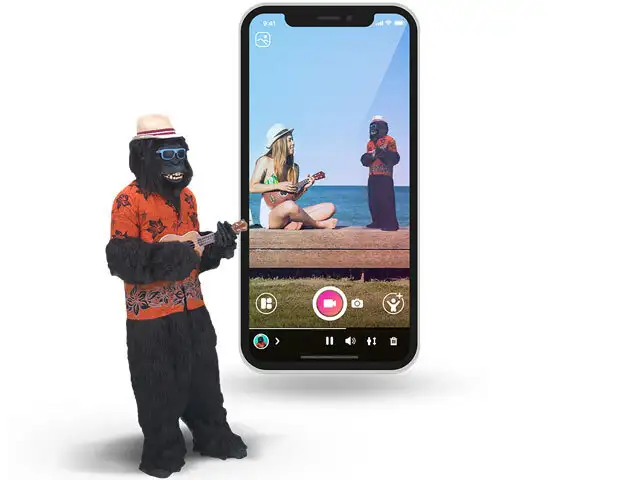
Holo is short for holograms — actual 3D animals and people you can place into your real surroundings. Some of the holos you can download for free include Spiderman, a zombie, tigers, celebrities and even Bollywood dancers. The developer is constantly adding more holos that you can download to your device. Holos are dynamic, which means they’re not static images but accurate, moving avatars. Once you scan a flat surface and place a holo, you can rotate it and scale it up or down in size to match real world sizes. Then you place yourself into the frame and snap a photo or capture a short video. In the right kind of lighting, it can look quite convincing too. Holo is also available for Android.
(Image: https://thisisholo.com)
Holo is short for holograms — actual 3D animals and people you can place into your real surroundings. Some of the holos you can download for free include Spiderman, a zombie, tigers, celebrities and ..
Read More
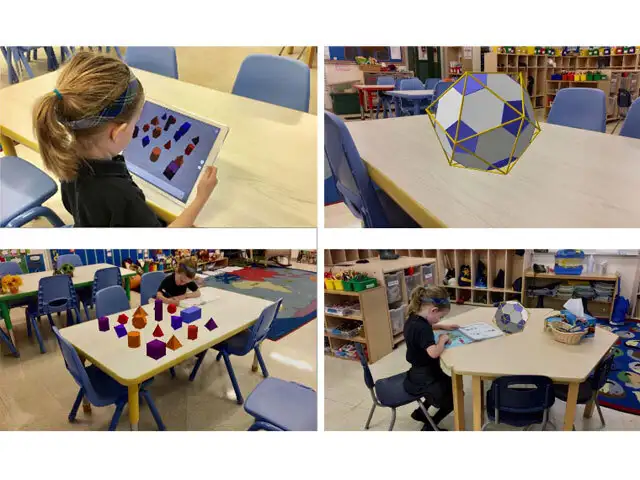
Learning is a lot more fun in AR and if a complex subject like math can be visually represented in your real world, it might make concepts a lot clearer. GeoGebra places math objects in your world so that you can explore them from different angles. You can place solid objects into your view while little exercises teach you about pyramids, prisms and cubes. More advanced users can look at the impossible Penrose triangle, 3D functions, spiral staircase and Sierpinski pyramid among others. You will have to physically move around the virtual objects to complete the tasks and take the required screenshots.
(Image: www.geogebra.org)
Learning is a lot more fun in AR and if a complex subject like math can be visually represented in your real world, it might make concepts a lot clearer. GeoGebra places math objects in your world so..
Read More
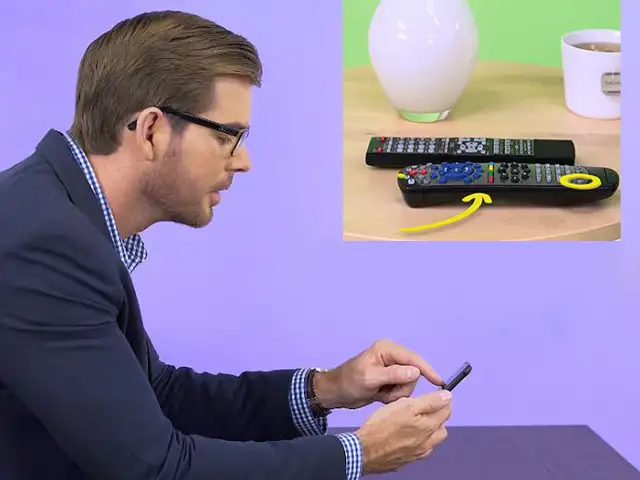
This app is a great example of how AR can help solve problems even in long distance. If you’re tech savvy, you’ve probably been asked for help with common tech issues over the phone. Problem is, over the phone, it’s really hard to explain to someone which button to tap, which menu item to click and which port to use. Vuforia’s Chalk opens up an AR guided private chat between you and the person you’re helping. They can activate their camera and you can doodle with virtual chalk right into their view — making circles, drawing arrows and illustrating as needed. But that’s not even the best part. Whatever you draw on sticks to the item you drew it on, so even if the camera moves around, the instruction stays true and correct.
(Image: https://chalk.vuforia.com)
This app is a great example of how AR can help solve problems even in long distance. If you’re tech savvy, you’ve probably been asked for help with common tech issues over the phone. Problem is, over..
Read More
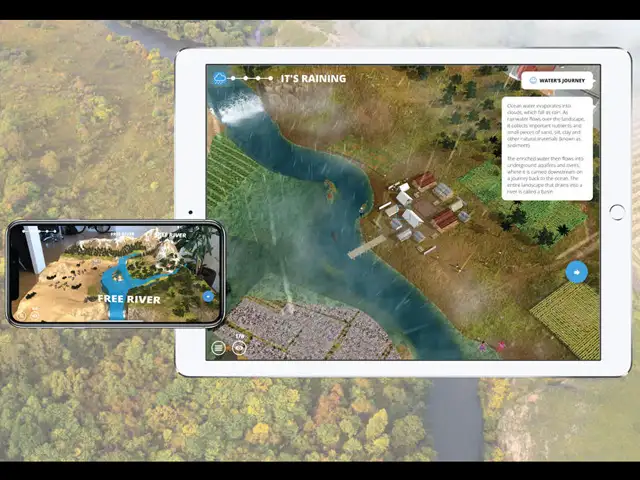
Imagine seeing an entire, living landscape on your table. You can zoom in, look around and learn more about why free flowing rivers are so important. Through helpful little floating tips, you learn more about the journey of water, how it impacts the area through which it flows, the people it affects and how building dams can cause damage to delicate ecological systems. Place a dam and you can see (in accelerated time) how the river changes and how everything else is affected downstream. This app is the WWF’s concerted effort to educate about how human development can either be harmful or sustainable.
(Image: www.worldwildlife.org)
Imagine seeing an entire, living landscape on your table. You can zoom in, look around and learn more about why free flowing rivers are so important. Through helpful little floating tips, you learn m..
Read More
Graffiti in a public place can help beautify but it can also be an eyesore, with authorities stuck in a never-ending cycle of removing unwanted art.
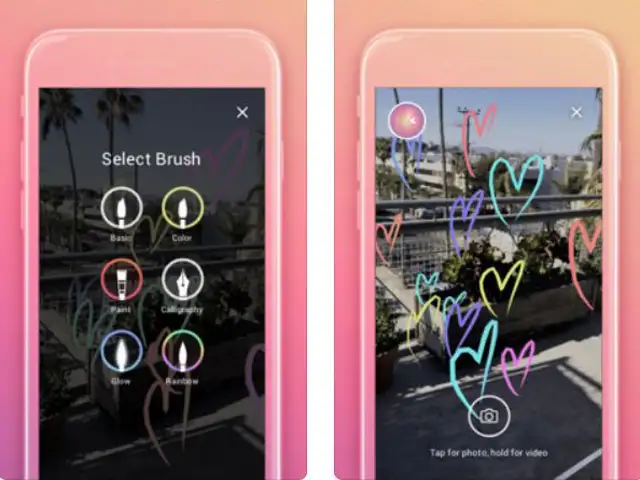
What if that graffiti only existed in the virtual world and was only visible through an augmented reality app? That’s the idea behind World Brush.
You open up the app, hold it up and start drawing in virtual space. You should do this somewhere outdoors and your art will be geo-locked — this means it’s approximate GPS location is tagged and if another World Brush user comes along at a later date and holds up the app, he/she will be able to see and walk around what you drew. Another similar app without the GPS position (but more brush options) is 3DBrush — Augmented Reality.
(Image: https://itunes.apple.com)
Graffiti in a public place can help beautify but it can also be an eyesore, with authorities stuck in a never-ending cycle of removing unwanted art.
What if that graffiti only existed in the virtual..